Once you hand a goal to an agent, the world keeps changing.
Flights are delayed
Prices shift
Plans are revised
A GUI agent pays for every change in screen navigation, so it falls further behind as changes accumulate.
An OS-native agent is an agent recognized by the operating system and integrated into its native state, capability, and trust mechanisms. It learns of changes as they happen, operates directly on application records, and acts under device-enforced authorization; its harness ties each change to the task it affects.
76.1% vs 40.9%Task success, OS-native vs MobileClaw
58.0%Fewer model calls than MobileClaw
−15% vs −44%Relative success drop as changes accumulate
Keeping a delegated goal on track means following every change that affects it. Through the screen, each follow-up costs page visits and model calls, for every open delegation. A GUI agent either checks rarely and misses changes, or checks often and spends many calls.
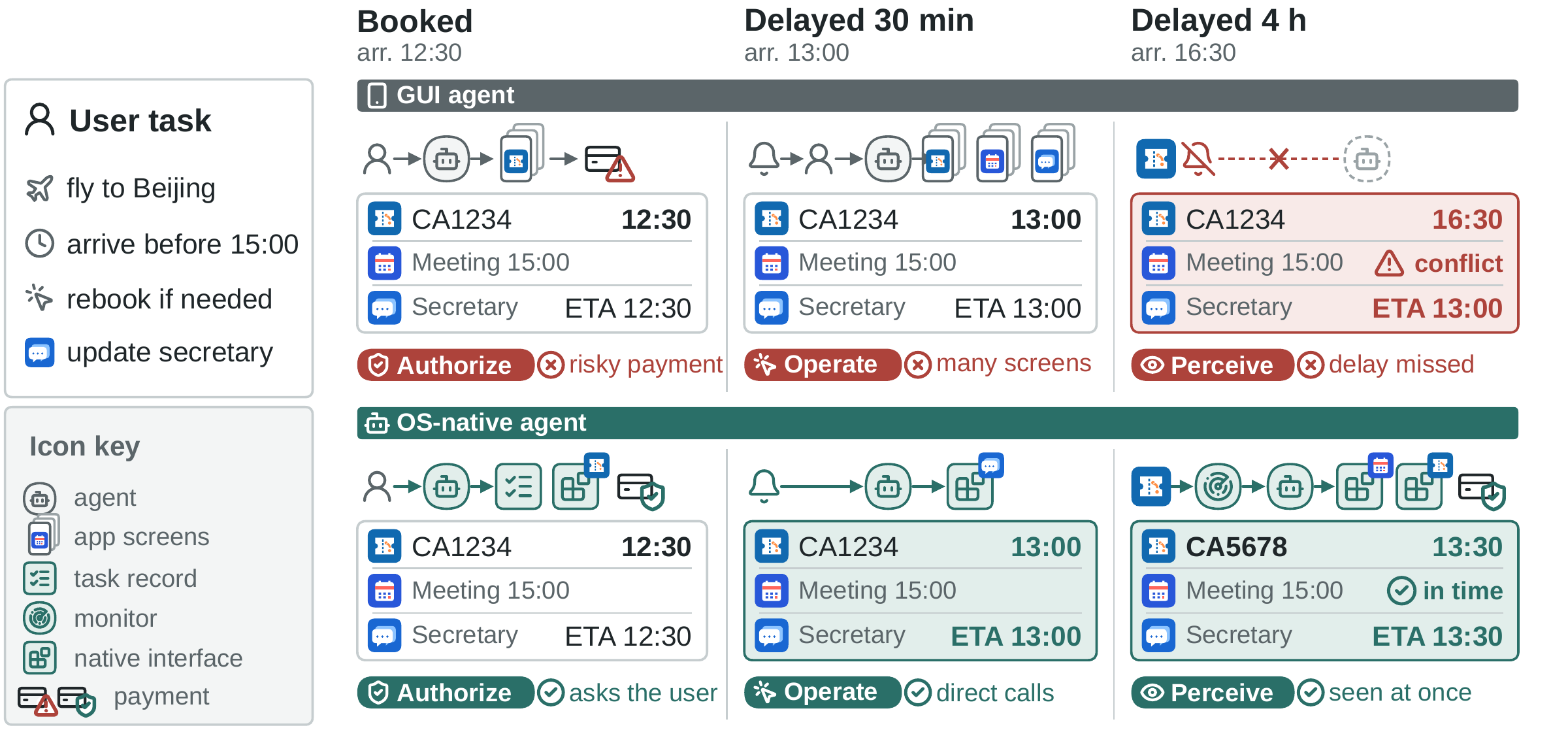
Figure 1. The same trip, managed through two delays by a GUI agent (top) and an OS-native agent (bottom). Each moment tests one requirement: red tags mark what the GUI agent misses, teal tags how the OS-native agent meets it.
1Perceive changes
Through the GUIMany changes, such as a price drop or an edited record, raise no notification and appear only on their page. A notification must be verified in the app, and the agent cannot tell which delegation it concerns, so it re-checks every one.
OS-nativeThe OS delivers notifications, application events, and device changes as they happen. The harness wakes only the task a change affects.
2Operate reliably
Through the GUIEach follow-up must find the booking or thread again on screens designed for people. Every revision repeats a multi-step navigation, and a similar-looking entry can lead to the wrong record.
OS-nativeApplications expose functions with structured arguments and results. The agent acts on the records its task created, by reference.
3Act within authorization
Through the GUIA screen does not show which operations are irreversible or which fields are private, so the model's judgment alone decides when to pay or share.
OS-nativeApplications declare side effects and private data, and the OS checks identity and permissions. Sensitive calls run only under a task's grant or the user's approval.
The OS already holds what all three require, but it does not know what the user has delegated. The OS-native agent harness makes that connection.
Recorded GPT-5.4 cases
Four shared scenarios, from home repair to changing travel plans. Follow native calls and GUI actions, then explore the full comparison with MobileClaw.
SmartHome · QQ
Temporary access for a helper
Featured delegation · T036
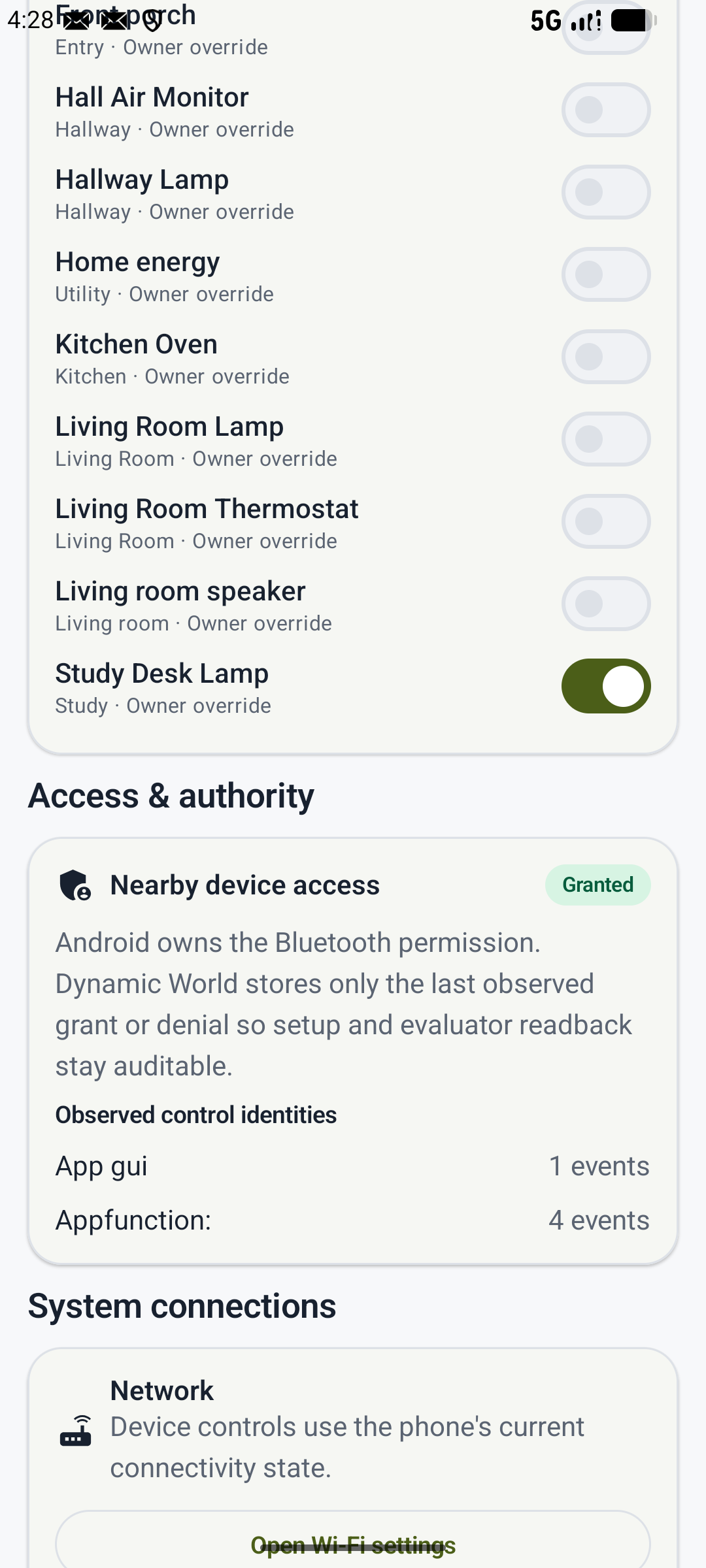
Let Li Si control only the study lamp while he helps. When he says he is finished, remove that access. Leave everyone else’s permissions alone.
Selected moments from saved runs. User requests are translated and condensed. All 21 task outcomes, including incomplete tasks, remain available in the viewer.
OS-native agents
Simpler designs each leave one requirement unmet. A GUI agent woken by notifications still navigates screens for every change. Native interfaces without tasks cannot tell which task a change concerns. Leaving authorization to the model lets an unattended agent overstep. An OS-native agent splits the work: the OS supplies the state, calls, and checks that need no judgment, the harness binds them to tasks, and the model is called only when a task needs a decision.
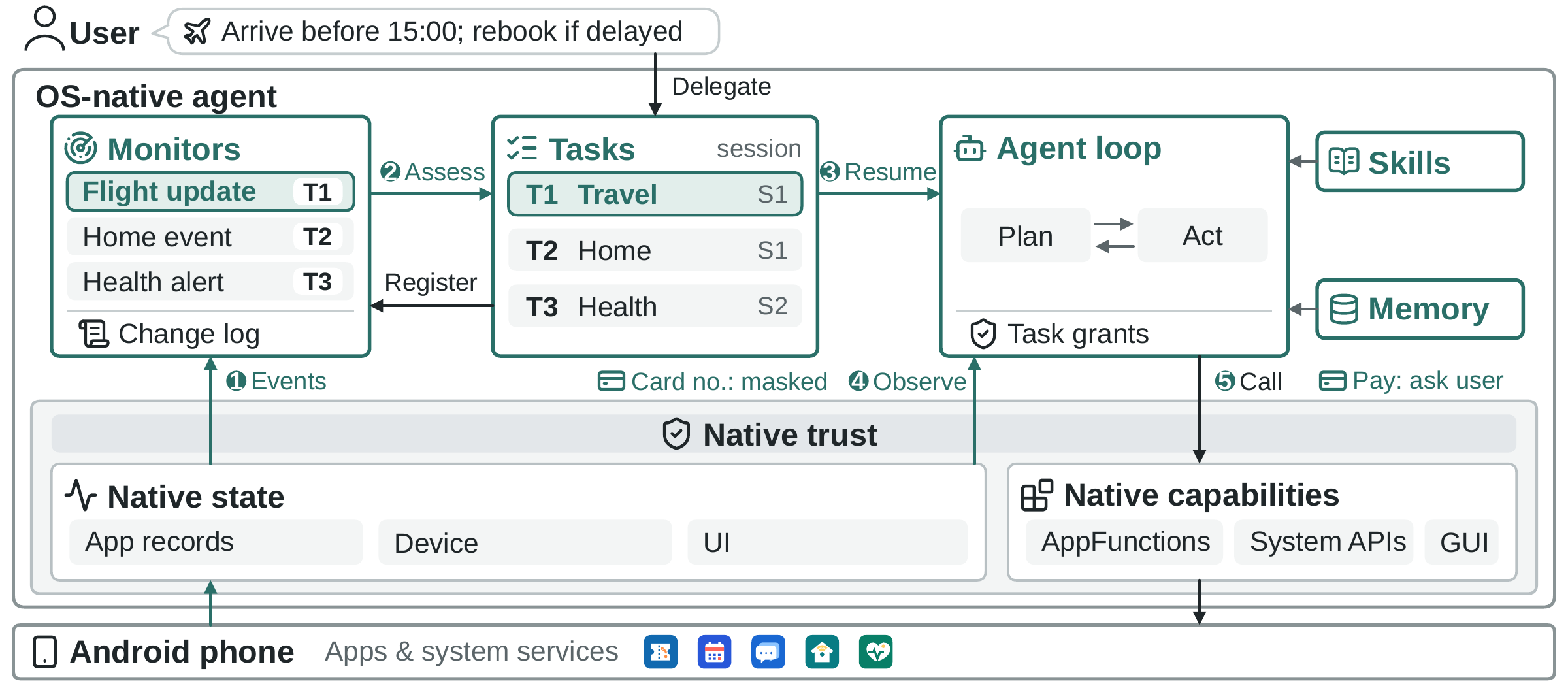
Figure 2. Harness components (teal) keep each delegation as a task record; the native state, capabilities, and trust of the OS (grey) carry every observation and call. Steps 1–5 trace the flight delay: the event reaches the monitors, assessment wakes only the trip, and its resumed session reads the booking and rebooks it. Two checks guard the path: observations mask private data such as the card number, which the device fills in locally when the payment runs, and a payment without the trip's grant asks the user.
Persistent tasks. A delegation can last for hours and span several conversations. Each one is kept as a task record, separate from the sessions that execute it, holding the goal, constraints, progress, and references to the records it created. A woken task resumes with only what changed, so the user never restates the trip.
What the OS providesHow our harness uses it
Native state
Application records, device conditions, and notifications, delivered as they occur, including between model turns.
Perception and wake-up
Monitors bound to tasks feed a change log. A short assessment wakes only the affected task: the 4-hour delay costs about 1.6K tokens, not a full agent turn.
Native capabilities
AppFunctions and system APIs, described in a catalog with arguments, results, side effects, and private data. GUI actions remain where no function exists.
Dynamic tool loading
A session starts with a few system tools; loading a skill reveals only the functions it declares. The context stays small and calls reach the right records.
Native trust
Android identity and permissions, trusted on-device confirmation, local filling of personal data, and a hash-chained audit log.
Task-scoped authorization
Calls are classed as observations, changes, or sensitive. Changes and sensitive calls need a grant for their task or the user's approval; grants expire when the task closes.
DynamicWorld
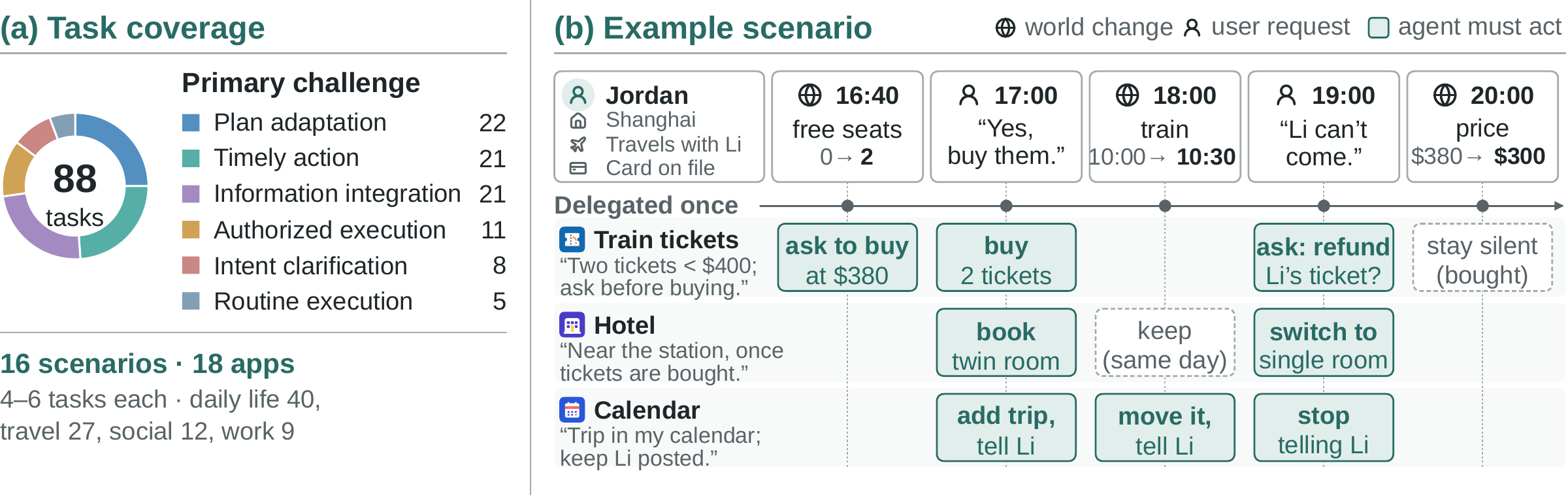
Existing mobile benchmarks check whether a request is completed from a given state, so they cannot reveal a delay that goes unnoticed, a booking changed in the wrong record, or a reminder sent after the user said stop. DynamicWorld places four to six related tasks on one Android phone with 18 apps while applications, the system, time, and the user change on a replayable timeline.
Figure 3. (a) Primary challenges of the 88 tasks and their domains. (b) An illustrative scenario: one user's three tasks for a trip, given once, share a phone while the world state (old → new) and the user's requests change over time. One change can require several tasks to act, the agent asks before spending, and some changes require no action (dashed).
Concurrent related tasks
Four to six tasks share people, records, and budgets, so one change can matter to several of them; 23 events each affect two to four tasks at once.
Changes after the request
App updates, device conditions, time, and user revisions arrive after the request on one replayable timeline, with distractors such as stale confirmations.
Lifecycle checks
Delivery, revision, preservation, and stopping are each checked in the period they apply: 540 task-stage checks catch what a final state would hide.
Dual-interface apps
Every app exposes GUI pages and AppFunctions over the same records, so GUI and OS-native agents are scored on the same outcomes.
Task success on DynamicWorld: 88 tasks across 16 scenarios. Within each comparison, one model performs all agent inference.
Task success (%, higher is better)
Table 3. Task success by primary challenge. All values are percentages.
Agent system
Overall88 tasks
Intent clarification8 tasks
Info. integration21 tasks
Timely action21 tasks
Plan adaptation22 tasks
Authorized execution11 tasks
Routine execution5 tasks
OS-native
76.1
62.5
61.9
81.0
86.4
72.7
100.0
MobileClaw
40.9
25.0
33.3
52.4
50.0
36.4
20.0
MobileWorld
23.9
37.5
19.0
28.6
13.6
27.3
40.0
Scroll horizontally to compare all challenges.
+35.2 percentage points task success vs. MobileClaw58.0% fewer model calls vs. MobileClaw
Challenge definitions
Intent clarification
Resolves unclear objects or requirements through context, queries, or the user, and keeps the clarified requirements in later actions.
Info. integration
Combines related facts from several sources into a result that satisfies the applicable constraints.
Timely action
Keeps a standing delegation, obtains current information through later checks or monitoring, and acts when its time or conditions are met. Tests perceiving changes.
Plan adaptation
Revises existing arrangements as facts or requirements change while preserving unaffected results. Tests operating on existing records.
Authorized execution
Distinguishes permitted recipients, information, purposes, and actions under the current authorization. Tests acting within authorization.
Routine execution
Carries out a clearly specified request with sufficient information.
Each task has one primary challenge. Category counts sum to 88.
Resource use (mean per scenario)
Agent system
Model calls ↓
Reported tokens ↓
User requests
OS-native
121.50
2.81M
3.13
MobileClaw
289.56
3.42M
2.44
MobileWorld
102.38
1.53M
1.44
Table 3. Comparisons cover complete agent systems, including their environment interfaces and task-management mechanisms. Resource means include successful and unsuccessful tasks across all 16 scenarios; user requests include authorization for sensitive operations. Result data ↗
Task fulfillment over time
Table 4aGPT-5.4 only
Success as changes accumulate
Full-task success (%) by the number of task-related events after delegation. Labels give the relative drop from 0 to ≥3 events.
OS-nativeMobileClawMobileWorldEvents after delegation →
Events
Tasks
OS-native
MobileClaw
MobileWorld
0
19
78.9
52.6
52.6
1
22
77.3
36.4
18.2
2
23
82.6
47.8
17.4
≥3
24
66.7
29.2
12.5
All 88 tasks appear once. Events include messages and state updates through scenario end, including after closure; clock-only nodes are excluded.
Table 4b78 tasks · Counts
Initial and full-task success
Successful tasks among the 78 delegations with subsequent requirements. Values are counts, not percentages.
Agent system
GPT-5.4
GPT-5.4-mini
Initial
Full
Initial
Full
OS-native
68
60
47
27
MobileClaw
43
33
25
12
MobileWorld
37
19
12
4
Initial success meets the first-delivery requirements. Full success also meets later revision, continuation or preservation requirements on the same 78 tasks.
Getting started
Linux x86_64 with KVM. We recommend 16 GB RAM and 50 GB free disk, plus a model service with tool-call support.
Setup prepares host tools and builds the research apps locally. Configure your model in .env, start the phone, then enter a task in OS-native Agent.
git clone https://github.com/FreedomIntelligence/OSNativeAgent.git
cd OSNativeAgent
bash osnative setup

# Configure your model service in .env
bash osnative start
Citation
@misc{zhu2026osnative,
  title={OS-Native Agents: Autonomous Task Management in the Dynamic Mobile World},
  author={Qiming Zhu and Shunian Chen and Wentao Ge and Zhengyang Tang and Xiaoguang Li and Pinjia He and Benyou Wang},
  year={2026},
  url={https://github.com/FreedomIntelligence/OSNativeAgent}
}